Martindale-Avvo Leads Manager: How To Request a Lead Credit
Welcome to your Leads Manager. We value your time and resources and want to make sure you’re only paying for quality leads.
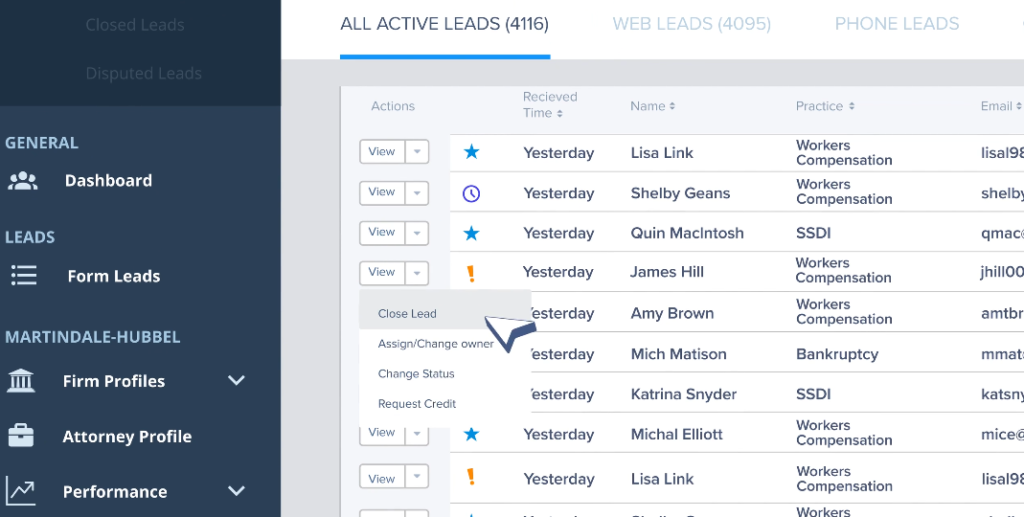
That’s why we offer case by case lead credit reimbursement. To start this process, click the view button next to the lead in question and select request credit from the dropdown. Select your reason for your request in the popup window, include any relevant comments and hit submit.
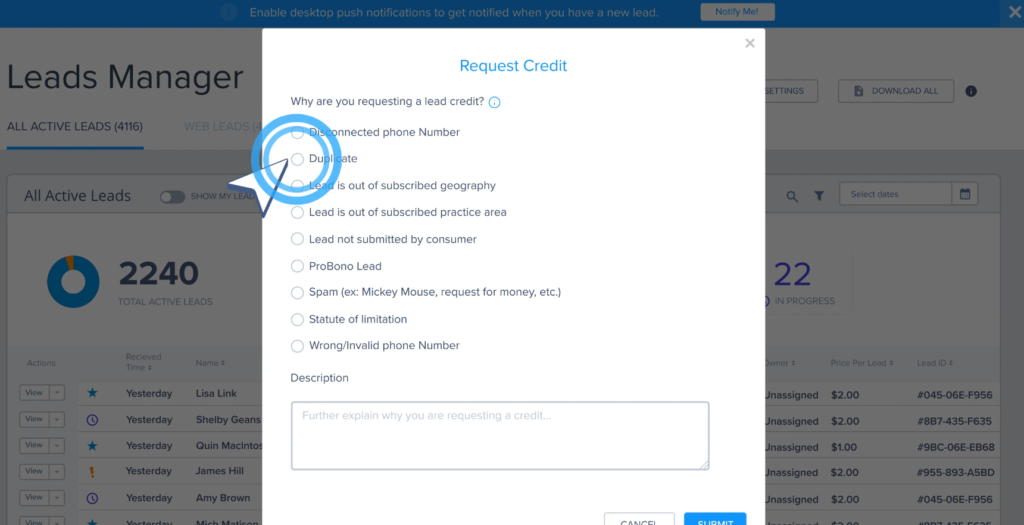
Please refer to our lead credit policy for what circumstances qualify for a credit reimbursement. Some examples include but are not limited to duplicate leads, invalid contact information, unrelated practice area, outside geographical range, and others. The leading question will automatically move to the disputed leads tab.

It will not move to closed leads until you manually close it. All submitted requests will be reviewed by our staff.
If your request is approved, a credit will be applied to your account. Please note you have seven days from the time a lead comes in to request a credit. After this timeframe, requests cannot be processed.
Thanks for watching this overview of your Leads Manager.
We hope you continue to explore the platform and enjoy using some of our key features.